Living with Type 1 Diabetes (T1D) is a constant, 24/7 balancing act. The best metaphor I’ve seen is having to keep a balloon in the air at exactly the right height all day, every day, even when sleeping.
Technology has definitely made this easier over the years. When I was diagnosed with diabetes in 2003, I used test strips and finger pricks to check my blood sugar levels. Checking 8 times a day was considered gold-standard care, and all at the low, low price of bleeding and ’train tracks’ on my fingers!
Now, with Continuous Glucose Monitors (a device that inserts a tiny sensor under my skin) I can see my blood sugar levels every 5 minutes - that’s 288 times a day! This allows me to achieve something like 90% time in range, something that would have been considered near-impossible.
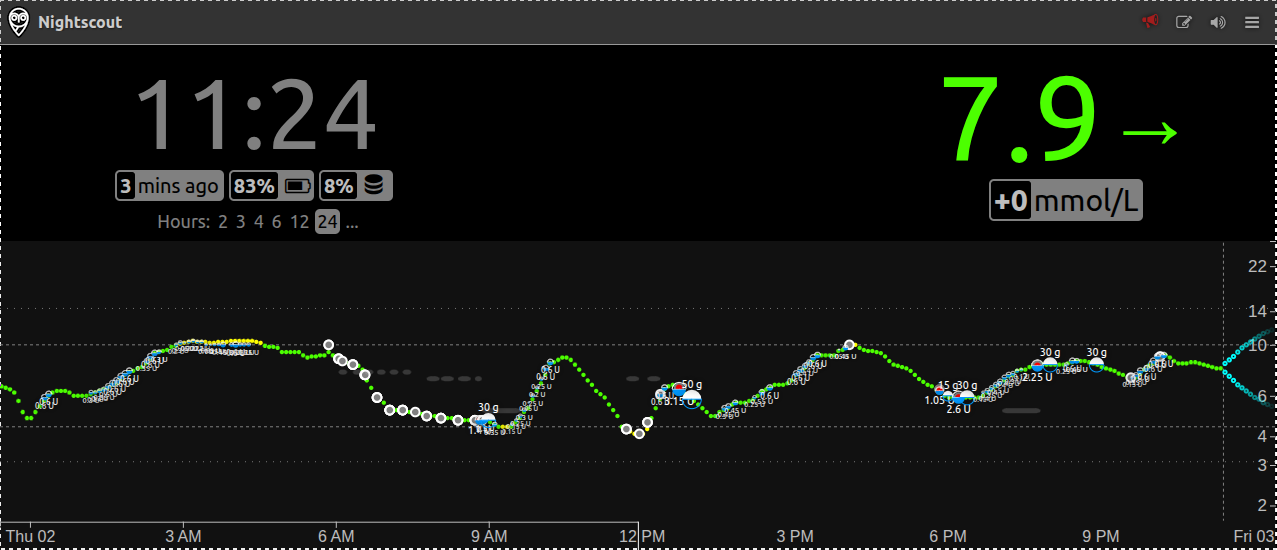
Here is a timeseries of my blood sugar levels every 5 minutes for the last 24 hours. I use carbohydrate counting, insulin and activity to manually keep it in range (hopefully!) at all times
Most diabetics use regulatory-approved commercial solutions. While these are amazing, many of us want more control or features. This gave rise to the incredible DIY T1D community, united under the slogan: #WeAreNotWaiting.
The Power of Taking Control: What is a Closed Loop?
At the heart of this DIY diabetic movement is the Closed Loop system (or artificial pancreas).
Traditionally, a person with diabetes acts as a manual computer - constantly reading CGM data, counting carbs to calculate insulin doses, correcting highs, and predicting lows 24/7. A closed-loop system automates this by linking the CGM and the insulin pump via an open-source algorithm (like AndroidAPS or Loop) running on a smartphone. Every few minutes, the algorithm predicts where blood sugar is heading and automatically adjusts the pump’s insulin delivery.
While not perfect, I can honestly say this technology has been life-changing for my physical and mental well-being.
Personally, I use a combination of AndroidAPS, xDrip, and Nightscout to run my loop.
The Healthcare Professional Gap
However, taking diabetes management into your own hands comes with a challenge: not all healthcare professionals (HCPs) look on DIY tech favorably.
The responses from endocrinologists and clinics vary wildly:
- The Skeptics: Many T1Ds receive active pushback or even refusal of care from doctors unfamiliar with open-source software, or bound by strict institutional rules. This can cause huge anxiety, as often T1Ds are threatened to lose access and funding to their CGMs and pumps - the things keeping them alive.
- The Advocates: On the other end, some endocrinologists look at the outstanding results, see how well their patients are doing, and actively recommend or support trying these tools.
- The Supportive but Overwhelmed: Most clinicians and educators land in the middle. For example, my diabetes nurse - who I see once a year - gives amazing insights, spends time looking over my numbers, and is highly supportive of my DIY tools. But she has hundreds of patients and simply does not have the time to learn the ins and outs of every custom DIY setup or home-brewed dashboard.
Bridging the Gap with Nightscout Lucid
The Skeptics need a way to see “this is just like the official approved version I’m used to”. The Supportive but Overwhelmed just prefer to use familiar tools so they can help as many people as possible.
This is exactly why I built nightscout-lucid.
It bridges this communication gap by translating your DIY Nightscout data into a dashboard very similar to Dexcom Clarity. By providing familiar layouts, data and charts - like the Ambulatory Glucose Profile (AGP) and standard Time in Range charts - clinicians can focus on the work rather than being daunted by tools.
My hope is that by presenting data in a format they trust, we can ease clinician anxiety and turn “skeptic” providers into supportive allies of the DIY T1D management.
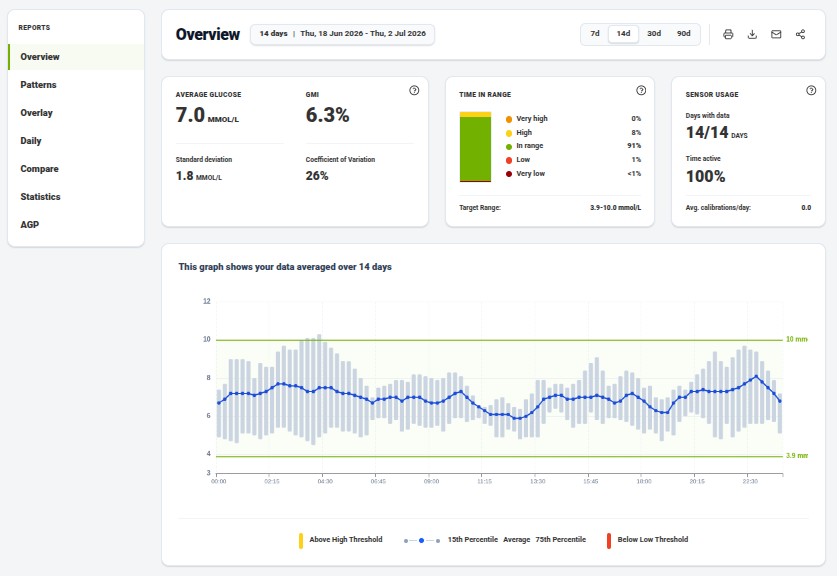
The Nightscout Lucid dashboard overview, providing standard Time in Range, average glucose, and GMI statistics.
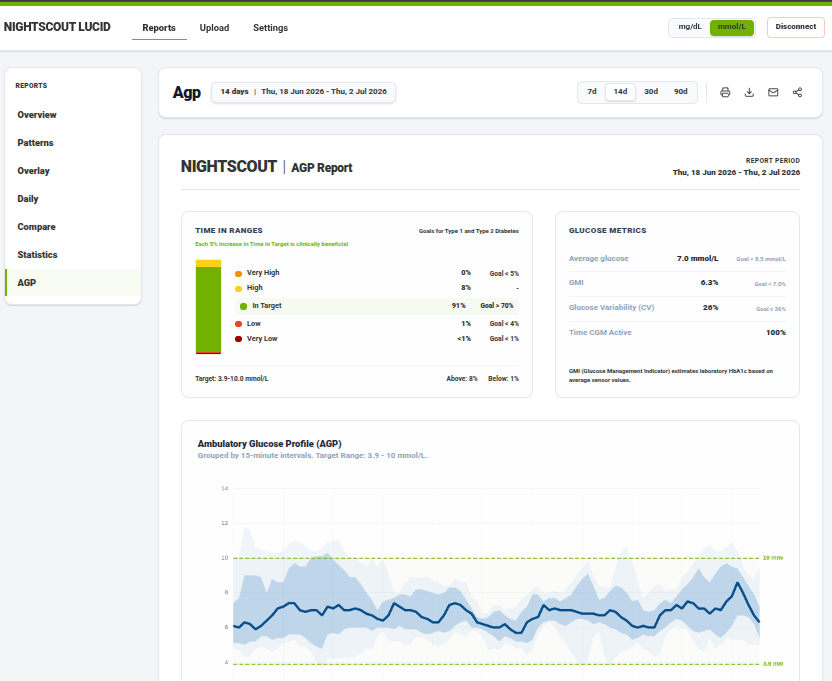
The Ambulatory Glucose Profile (AGP) report, displaying standard percentile curves and glucose stats.
Try it out
If you want to try it out, you can check out the official demo at goodnumbers.net/clarity or view the repository on GitHub at github.com/ssuppe/nightscout-lucid.